Butterbian XFCE 0.4.0 — same snapshots, whole new look
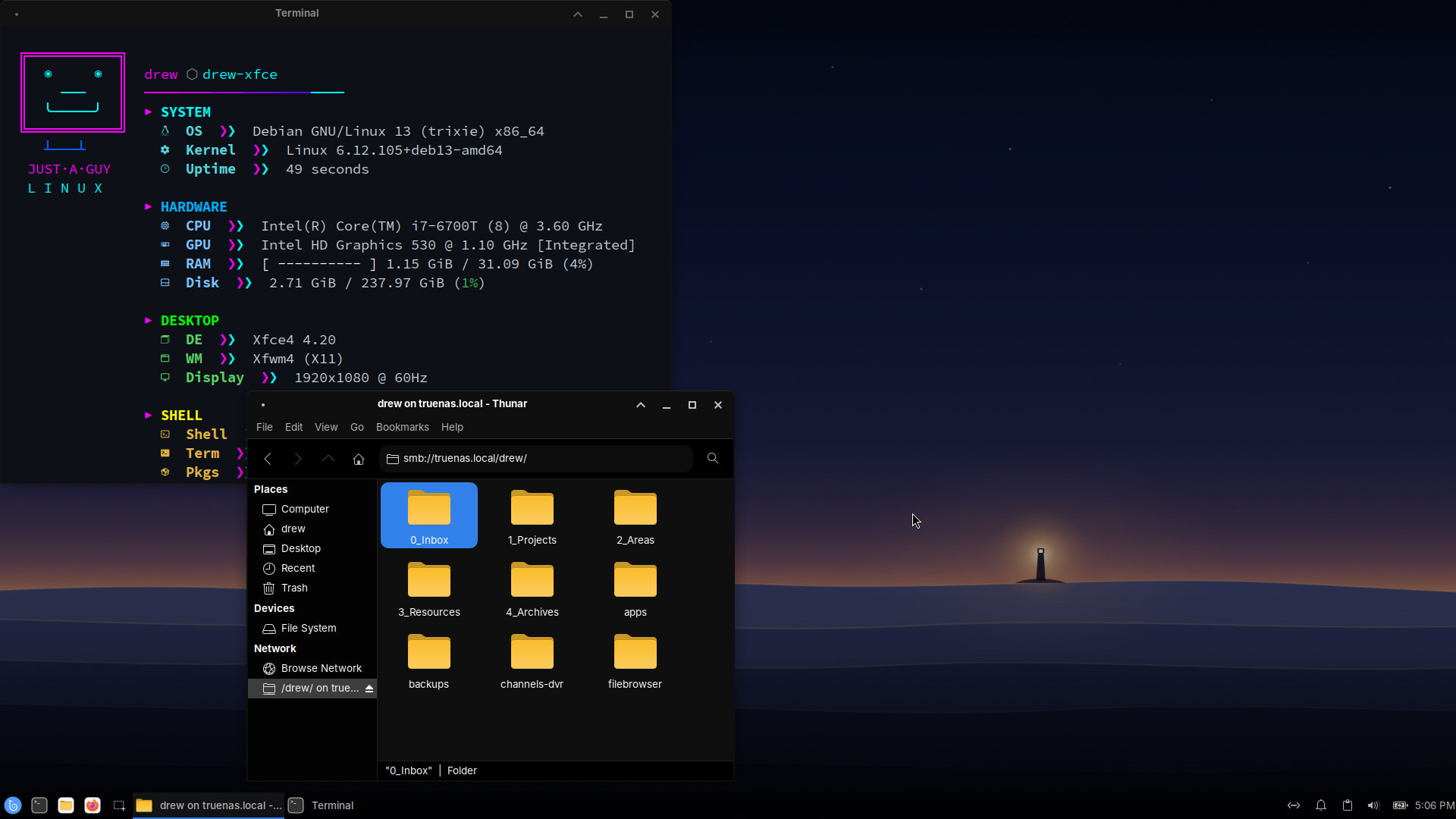
Butterbian XFCE 0.4.0 is out. The snapshot-first foundation hasn’t changed — btrfs subvolumes laid out for you, a Timeshift snapshot before every apt operation, rollback from the GRUB menu. What changed is everything you look at.
Fair warning: this release is almost entirely about the desktop. If 0.3.3 is working for you and you don’t care what it looks like, you’re not missing any plumbing.
The new look
The short version: 0.3.3 looked like stock XFCE with a wallpaper. 0.4.0 looks like a distro.
- Original artwork. The wallpaper is a twilight scene drawn for this release — a lone lighthouse lamp on a dark ridge. The boot menu uses the same art, so it’s one scene from power-on to desktop. Cottage and lantern variants ship alongside it, and the SVG sources are in the repo if you want to remix them.
- A real login screen. LightDM now gets the dark Butterbian treatment instead of stock gray — spotlight artwork, the Butterbian glyph as your account picture, and a login box that matches the rest of the system. Locking your screen takes you to the same place.
- Orchis (black) + Colloid icons. The desktop theme is Orchis in its black variant — near-black, flat, blue accents — with matching window borders, so titlebars and applications finally agree with each other. Folders are butter-colored (it’s Butterbian, what did you expect). If yellow folders aren’t your thing, grey, purple, and the stock blue variants are pre-installed — it’s one click in Appearance settings.
- Inter as the interface font, SauceCodePro Nerd Font in the terminal. The terminal itself still defaults to GitHub Dark with Catppuccin Mocha, Rosé Pine, and Tokyo Night presets included.
- A cleaner panel. Single-line clock, clipboard history (Super+V), no leftover clutter, and the menu button is now the Butterbian glyph.
Fixes worth knowing about
- Ctrl+Alt+L actually locks the screen now. The shortcut was wired up in 0.3.3 but no screen locker was installed, so it silently did nothing. light-locker is in and it locks to the themed greeter.
- New windows open centered instead of piling up in the top-left corner.
- Network shares work properly out of the box. Thunar could already browse SMB shares, but now mounted shares are visible to every application (gvfs-fuse), network browsing is more reliable (smbclient), and fstab CIFS mounts work (cifs-utils). If you have a NAS, this one’s for you.
- Thumbnails in Thunar and Ristretto no longer depend on which packages happened to come along for the ride.
- The theme and icon downloads during the ISO build are pinned to fixed releases, so a rebuild always produces the same desktop.
Existing installs
Butterbian is an installer ISO, not a rolling theme package — 0.3.3 systems keep working exactly as they are and keep getting Debian updates. The new look applies to fresh installs. If you want it on an existing system, the theming is all standard pieces (Orchis, Colloid, the wallpapers are in the repo), but there’s no automated upgrade path.
Download
- ISO + checksum + torrent: get.butterbian.org
- Project home: butterbian.org
- Source: Butterforge